
Hardware

3 Reasons To Move To The Cloud

Dell recommends three levels of solutions to move small businesses to virtualization. These offerings demonstrate that on site virtualization comes at a cost. However, expect excellent performance gains and real disaster recovery-ability once your systems are virtualized.
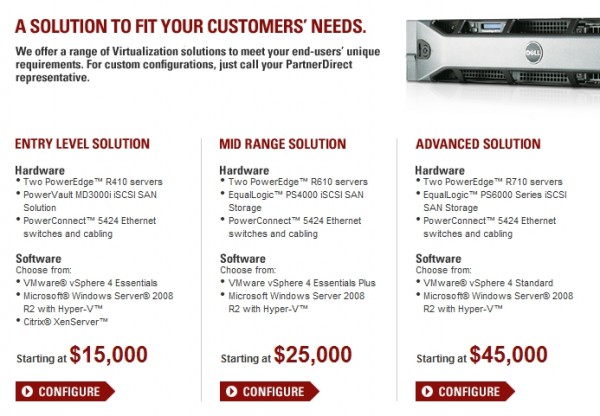
Considering the apparent cost of Dell’s virtualization and the current state of the economy, cloud services, built around the same Windows Servers, Citrix and VMware look pretty good. Dell’s three levels of solutions can help move small businesses to virtualization or they might be three reasons to move to the cloud. You do the ROI.

Many cloud offerings require no capital investment and no commitment other than a monthly expensed amount. Contact us so that we can migrate your systems to the cloud or to Dell’s virtualization solutions.

Need A Business Laptop Recommendation

This would be our choice today;

Lenovo ThinkPad SL510 2847 – Core 2 Duo T5870 / 2 GHz – Centrino – RAM 2 GB – HDD 160 GB – DVD-Writer – GMA 4500MHD – Gigabit Ethernet – WLAN : 802.11 a/b/g/n (draft) – Windows 7 Pro – 15.6″ Widescreen TFT 1366 x 768 ( WXGA ) – matte black – TopSeller – Microsoft Office Ready

We’re often asked for recommendations about what type of desktop or laptop computer that a business should purchase, so here they are.

1 – If you do computing primarily in a Microsoft Windows environment, such as most general mainstream business, education and government computing, stick with Microsoft Windows. The computer brand is not so important as long as it’s an internationally recognized brand. If your computing environment consists primarily of Apple Mac, high end graphics, web and conventional publishing, music and art, stick with Mac. Switching back and forth’s not for the faint of heart.

2 – Microsoft offers several operating systems that we find suitable for businesses; Windows XP Professional, Windows 7 Professional and Windows 7 Ultimate.

3 – Purchase as much memory as your budget can stand but get a minimum of 2 GB.

4 – Purchase as much warranty as you can afford. Plan for at least a three year life span with warranty to cover the term.

From time to time, we’ll try to save you some money here with links to specific computers. Some of these can be customized. You can purchase them by clicking the links or print the specs and purchase them from your local electronics outlet.

Windows Pro Laptops, Windows Pro Desktops, Apple Laptops, Apple Desktops

Save $80 off select Vostro laptops with Intel Core i7 processor with coupon code XDP76V01LRLSFG (ship fast laptops are excluded)

Save $40 off select Vostro laptops with Intel Core i5 processor with coupon code 3FPCVR24X0STBF(ship fast laptops are excluded)

Save $259 off Dell Vostro 260 business laptop with 2nd Gen Intel Core i5 processor, Win 7 Pro, and Dell E2011H 20-inch monitor! For $559 only after coupon code 3FPCVR24X0STBF

Dell OptiPlex 790 business desktop with Dell E2311H Widescreen Monitor,2nd Gen Intel i3 Processor, Win 7 Pro for only $599 after 43% savings!

Save $169 off Dell Vostro 260 business desktop with Intel Pentium G630 Processor, Dell 20″ Monitor, and Win 7 Pro! Now only $449!

You might ask, “Are all servers moving to the data center?” Unfortunately, no. As long as there is multi user software designed over ten years ago that moves monumental amounts of data between the client and server components of the application, we will have local servers, especially when those applications are owned by companies that slowly innovate their software architecture while milking a cash cow.

To this day, some of the earlier C++ client, SQL server applications cannot run in Microsoft Terminal Services. It is common practice to find heavier client software unmanageable in an environment that would put it in the data center. Expect this situation to stay around for some time. Just recently, we heard from a software company that not only was unversed in Windows 7, but also knew very little about Vista. They firmly insisted that we look at rolling back to XP and use a Microsoft Server 2003 to host the “database”. We’re less than two months from January 2010!

You need fast feet to compete. However, occasionally your software dictates the shoes you must wear. So, the last server you will ever need is the one you retire with your outdated software. The time will come.